
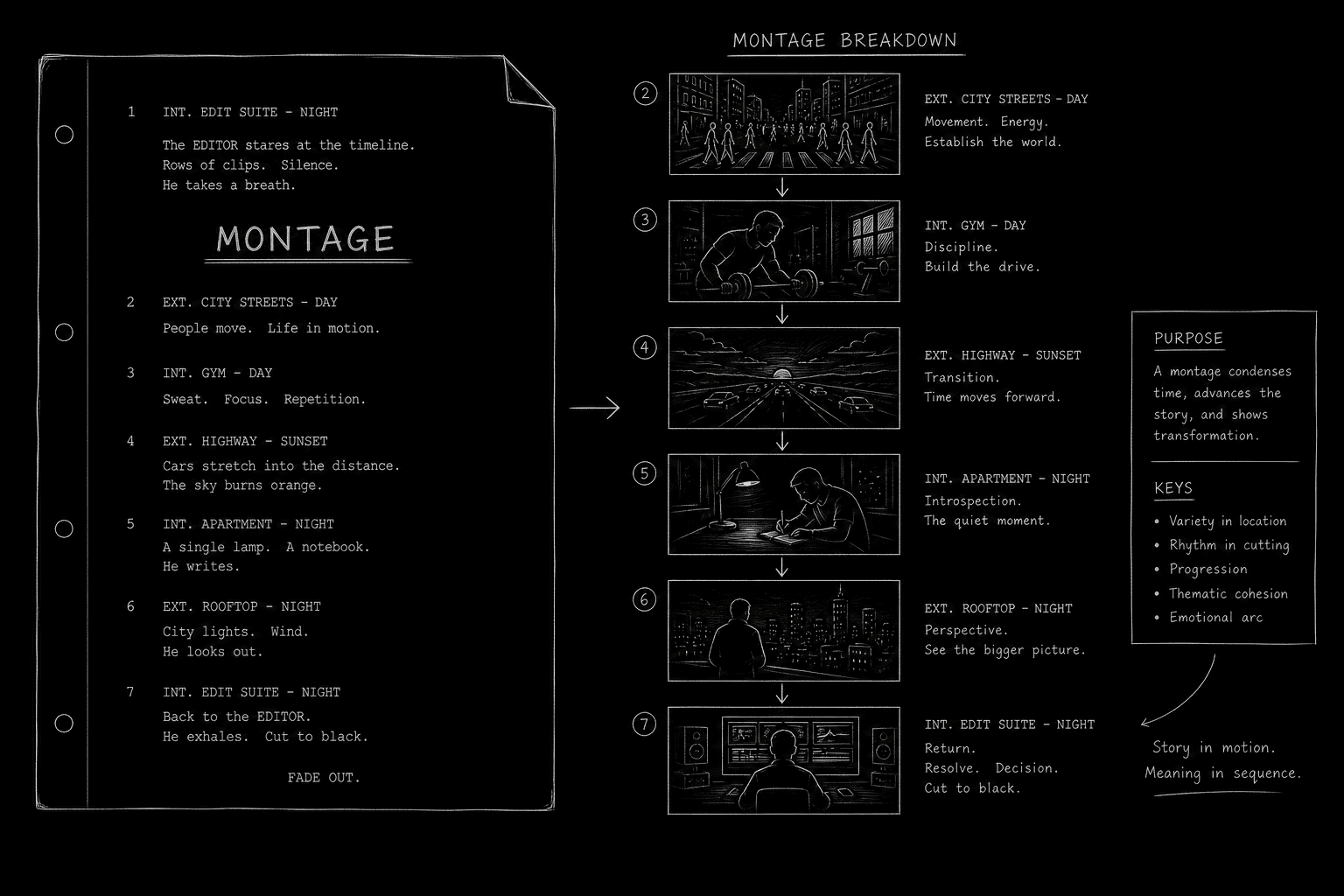
A montage compresses time. Training. Falling in love. A city changing. On screen it feels effortless. On the page it often reads like a traffic jam: too many locations, unclear order, and action lines that blur into wallpaper. Readers do not reward ambition they cannot follow. Montage screenplay format exists so you can show passage of time and accumulation of change without turning three pages into twelve.
The good news: montages are not a separate language. They are disciplined scene writing with a container heading and a rhythm the reader can scan in seconds.
A montage is not a list of pretty images. It is a sequence of cause-and-effect beats that add up to one idea.
How It Works: Montage as Compressed Story
A montage answers one dramatic question: what changed, and how fast? Every beat inside the montage should push that answer forward. If a beat only decorates, cut it.
Industry practice recognizes two primary containers:
MONTAGE signals a thematic or emotional compression. We may jump locations freely. Music often carries continuity on screen. On the page, you imply rhythm with short blocks and parallel structure.
SERIES OF SHOTS signals a tighter visual chain, often in one geography or one visual motif. Think: a building going up, a face aging, a trail of evidence across a desk. For the distinction between these two tools, see our guide on series of shots vs montage.
Both formats share a rule: establish the container once, then write lean interior beats. Do not repeat full slug lines for every micro-moment unless the location change is story-critical.
Platform and Use-Case Sections
Feature Films: Emotional Arc in Two Pages
Features use montages to land act turns. The hero commits. The relationship deepens. The town turns against them. Your job is to make each mini-beat legible in under three lines. Readers should feel acceleration, not exhaustion.
Pair montages with clear bookends. Open with a line that states the mission: "Over the next month, Lena turns the empty lot into a garden." Close with a line that lands the result: "The last seedling goes in. Neighbors watch from porches. Something has shifted."
Television: Teaser Energy and Act Breaks
TV montages often carry title sequences, relationship montages, or "previously on" energy. Episodic television rewards repeatable visual grammar: same time jump phrase, same block length, same way you tag dates if needed.
If your montage bridges two storylines, consider whether intercutting parallel action is cleaner than a single montage block. Montages compress; intercuts alternate. Pick the tool that matches the reader's job.
Short Films and Proof-of-Concept Scripts
Shorts use montages to cheat budget and calendar. A three-minute courtship montage can replace six scenes. That only works if each beat is castable and shootable. "City at dawn" is vague. "Maya and Jon share coffee on the same bench, three different weeks, cups multiplying" is production-ready.
Step-by-Step: Formatting a Montage That Reads Clean
Step 1: Name the montage's purpose in one sentence. Before you format, finish this line: "This montage proves that ___." If you cannot finish it, the montage is not ready.
Step 2: Choose MONTAGE or SERIES OF SHOTS. Use MONTAGE for multi-location emotional compression. Use SERIES OF SHOTS for a visual through-line with tighter geography. Write the container heading in caps, centered or left-aligned per your template.
Step 3: Write a setup line. One action line under the heading tells the reader what kind of time we are crossing: "Over six weeks, the band goes from garage noise to stage-ready."
Step 4: Stack mini-beats. Each beat gets a short slug or a bold location tag, then one or two action lines, then optional dialogue. Keep dialogue sparse. Montages breathe on image and motion.
Step 5: End with a button. A final image or line that pays off the setup: applause, silence, a closed door, a wedding ring on a nightstand. Then exit the montage with END MONTAGE if your template uses that convention, or roll into the next full scene heading.
Step 6: Read for scanability. Print the pages. Can a tired reader understand the sequence in one pass? If not, shorten blocks or reduce beat count.
Try it free
Try Screenweaver for free on your script
It is free. Import your existing project, get a clearer view of your outline, and regain control of your story structure in minutes.
Start FreeOperational Section: Requirements, Tags, and Production Details
Slug lines inside montages. You do not need INT./EXT. on every beat. Many writers use mini-headings:
- INT. GYM - DAY (WEEK 2)- EXT. ROOFTOP - NIGHT
Consistency matters more than decoration. If you use dates, use the same date format throughout.
Music and sound. If a specific song anchors the sequence, note it once: (MUSIC: "TITLE" by ARTIST plays over the following.) Avoid over-specifying temp tracks in a spec script unless tone truly depends on it. For sonic texture in action, see how to describe sound effects in a screenplay.
Voice-over in montage. V.O. can unify scattered images. Tag speakers clearly on first entry. Keep narration declarative, not explanatory. The images should do the proving; the voice comments or reframes.
Superimpose and title cards. If you use on-screen text ("THREE MONTHS LATER"), write it as a super or chyron once per time jump. Do not hide time jumps inside dense prose.
Page weight. A strong montage is often half a page to two pages. Beyond that, readers assume you could not decide what mattered. If you need four pages, you may need four scenes instead.
| Element | Include | Avoid |
|---|---|---|
| Container heading | MONTAGE or SERIES OF SHOTS | Alternating labels mid-sequence |
| Setup line | States duration or goal | Vague "various images" |
| Mini-beats | One clear change each | Redundant similar shots |
| Exit beat | Emotional or plot button | Hard cut with no landing |
[YOUTUBE VIDEO: Side-by-side read of a montage page from a produced film script, highlighting how mini-slugs, white space, and the final button create rhythm without camera directions on every line.]
Outcome and Results: What a Good Montage Delivers
When formatted well, a montage delivers four outcomes on the page and on set:
- Time compression the reader feels. The page count drops while story density rises.
- A single clear idea. Training montage proves dedication. Breakup montage proves erosion. The reader can pitch the sequence in one sentence.
- Shootable blocks. Each beat suggests a setup, not a novel. Departments can break the montage into a shot list without calling you for clarification.
- A smooth handoff to the next scene. The button beat sets up the following scene's conflict.
Run a table read on montage pages alone. If actors stumble, your dialogue inside the montage may be doing too much exposition. If the room loses the thread, your beats are not causally linked. Our table read guide applies here: hear the rhythm out loud.
Why It Matters: The Old Way vs the New Way
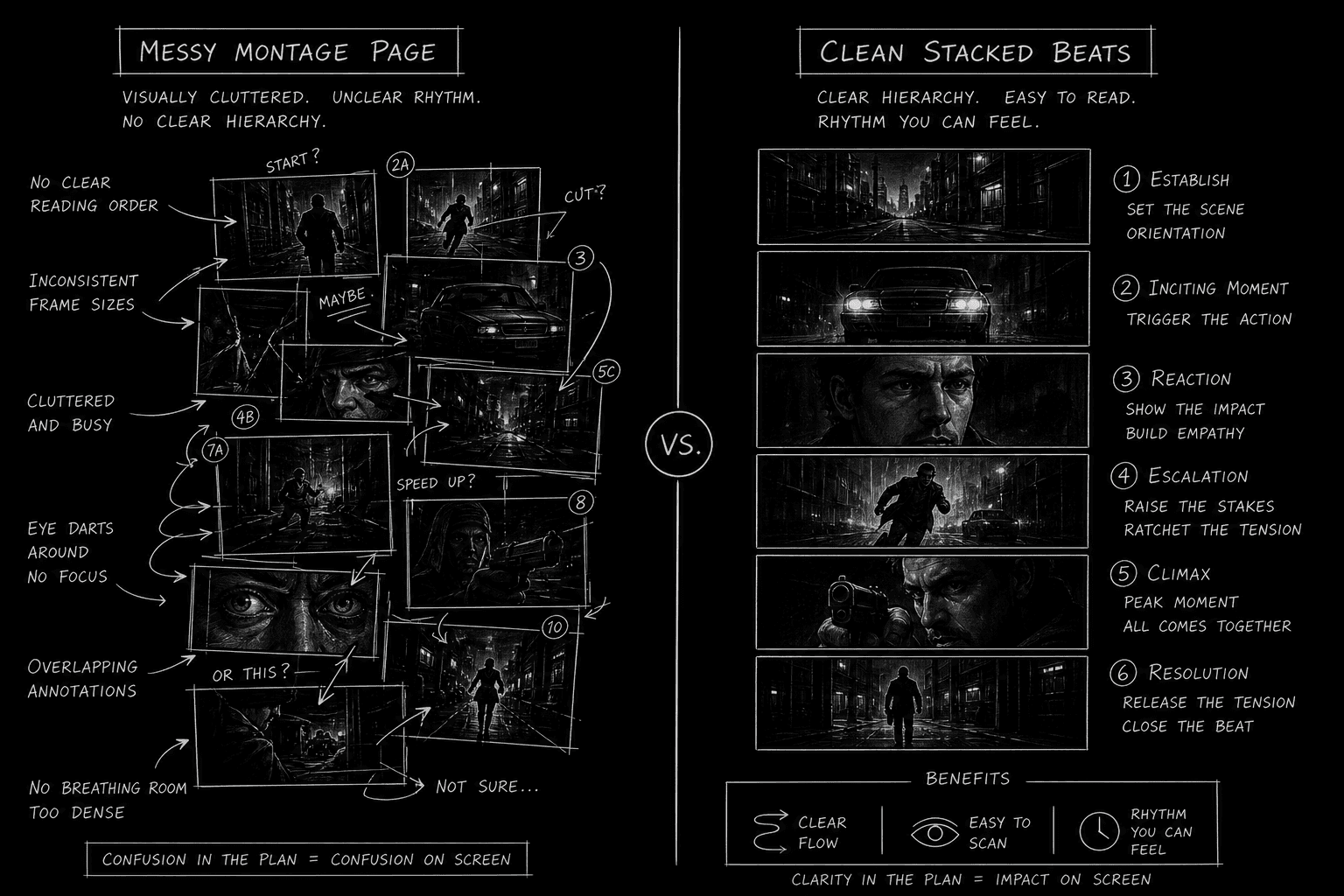
The old way: Writers treated montages as permission to dump every cool image they had in a notebook. Full slug lines repeated. Action lines turned purple. Time jumps hid inside paragraphs. Readers skimmed, then distrusted the writer's control of pace.
The new way: Writers treat montages as designed sequences with one thesis, repeatable mini-beat grammar, and a production-aware exit. The page looks calm. The story feels fast. That calm is craft.
Montage formatting also intersects with spec vs shooting script discipline. Specs should suggest vision without directing the crew shot by shot. Montages are where that balance is tested. Suggest outcomes ("She lands the vault.") rather than camera choreography ("Camera whips to her feet.").
Final CTA and Conclusion
Your montage is finished when a stranger can summarize it in one breath and a producer can budget it in one pass. Name the purpose, choose the right container, stack lean beats, land the button.
Open your draft montage now. Highlight every beat that does not change the central idea. Cut or merge until the sequence accelerates. Then format it so the reader's eye moves down the page like the cut moves on screen: fast, clear, inevitable.
Write the montage once with craft. You will not need to "fix it in post" on the page.
Final Step
Build your next script with Screenweaver
Move from ideas to production-ready pages faster with timeline-native writing and AI-assisted story flow.
Try Screenweaver