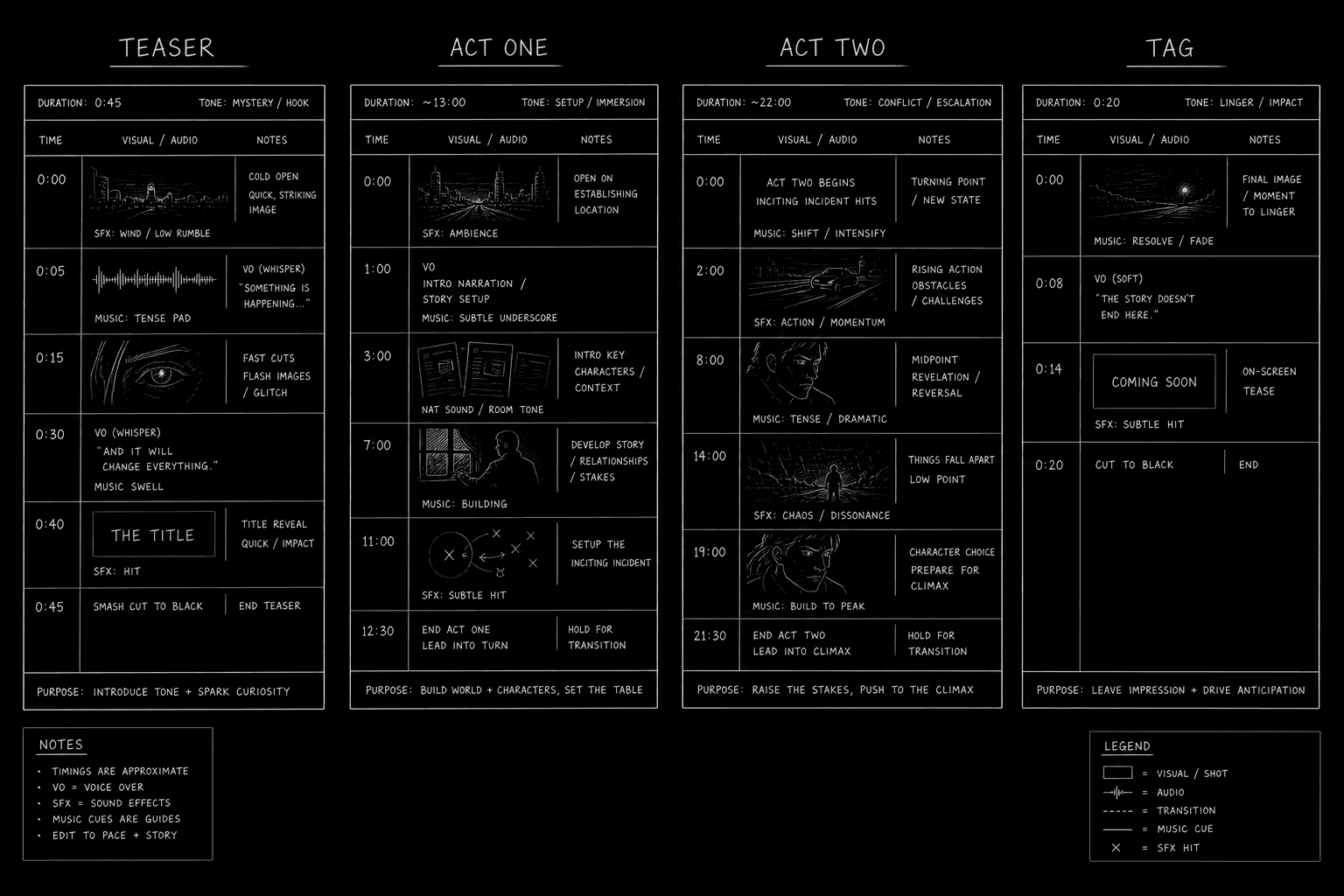

You open a network drama PDF and see words that do not exist in your film school template. TEASER. END OF ACT ONE. TAG. You wonder if the labels are decoration. They are not. On broadcast television, those labels are how the script talks to scheduling, ads, and a room that has been breaking stories in act-shaped chunks since before your favorite streamer had a logo.
Teaser, acts, and tag are not just tradition. They are timing modules. The teaser is the hook before the contract of act one. Acts are pressure chambers with outs that survive commercial interruption. The tag is the button after the climax that reminds the audience why they live with your characters weekly. Streaming may remove ads on the screen. The page grammar still shows up in coverage, in staffing samples, and in rooms where the showrunner learned on broadcast clocks.
This guide is how to format and write broadcast TV act breaks on the page: where labels go, what each module owes the story, and how to stop treating act breaks as empty white space. When you are building the beat spine that sits under those labels, the pilot beat sheet walkthrough on act breaks that earn their white space is the companion piece. For page bands and module length audits, use the TV pilot page count targets so your footer matches your format.
Broadcast format is a clock drawn in Courier. Labels tell everyone where the clock hands must land.
What Broadcast Modules Are Actually Doing
The teaser is not always the first scene chronologically. It is the first scene the broadcast night needs: tone, stakes, a question, sometimes a flash-forward. It tells the audience what kind of hour they bought.
Acts are story units that end with outs strong enough to survive a commercial or a streamer's soft pause. An act break is not "we stop because ads." An act break is "we stop because the story just turned."
The tag is short. It lands after the climax machinery. It can be a joke, a sting, a quiet image, a new question. It trains the series promise. Skipping the tag is how pilots feel like closed movies.
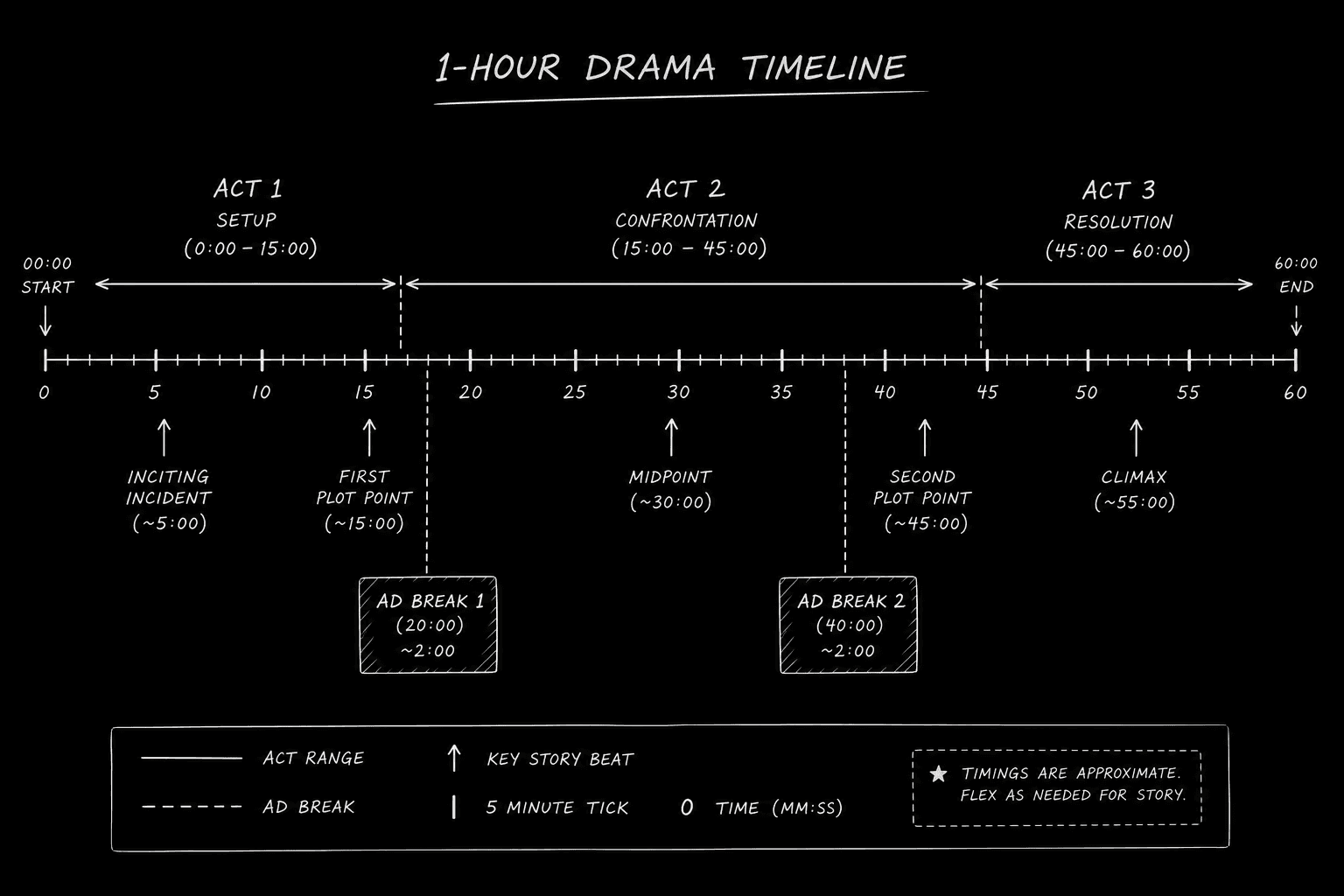
The Module Map Table (Typical Hour Drama)
| Module | Typical page span (hour drama pilot) | Format on page | Story obligation |
|---|---|---|---|
| Teaser | 2-5 pages | TEASER heading; may be all caps | Hook; question or spike |
| Act one | 10-14 pages | ACT ONE; end with END OF ACT ONE | World, cast, disruption |
| Act two | 10-14 pages | ACT TWO; act out turns obligation | Complication, commitment |
| Act three | 10-14 pages | ACT THREE; midpoint or reversal | Plan breaks, truth shifts |
| Act four | 8-12 pages | ACT FOUR; escalation, cost | Lowest point, forced choice |
| Act five | 8-12 pages | ACT FIVE; climax, pilot resolution | Series question deepens |
| Tag | 1-3 pages | TAG | Button; episode-two bridge |
Spans flex by show and year. The obligation column does not flex as easily. If your act three span is fine but the act out is soft, the module failed regardless of page count.
Formatting Labels on the Page (Without Looking Amateur)
Broadcast headings are visible. TEASER centered or left-aligned depending on comp. ACT ONE on its own line. END OF ACT ONE at the break. Some shows use "END OF ACT ONE" on the right margin. Match your comp lane.
Do not hide act breaks in invisible revision comments if the reader expects broadcast shape. You are not cheating sophistication. You are making coverage work harder for no reason.
Scene numbering may restart or continue depending on production; specs usually continue for readability. Ask if you have a script coordinator. If you do not, follow the PDF of a sold pilot in your lane.
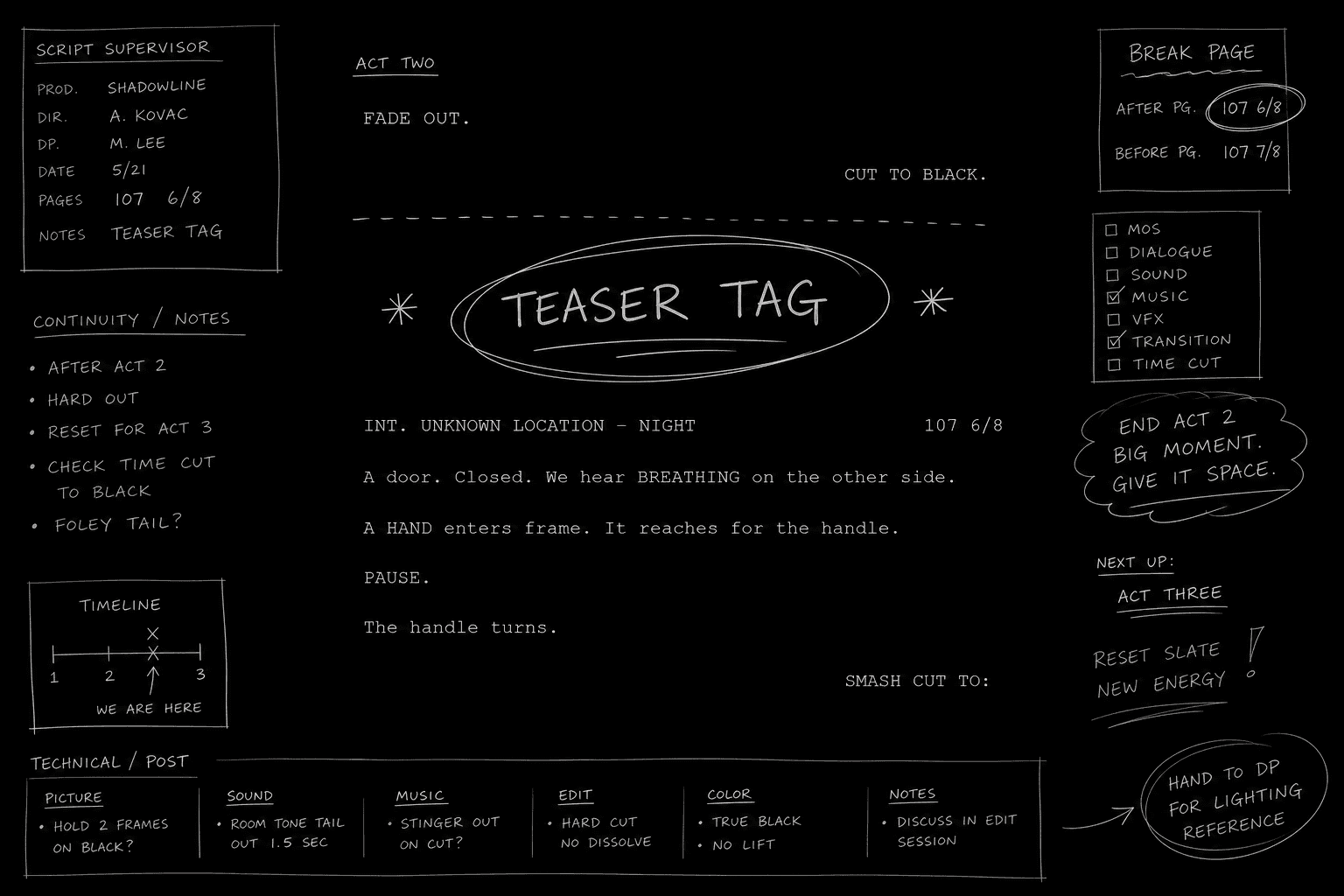
Transitions at act breaks often include "CUT TO BLACK" or a hard cut line. Do not stack five fancy transitions. Broadcast pages favor clarity.
For element basics before you debate headings, keep your Courier, margins, and sluglines honest. Formatting drift at the act label layer usually means the underlying template was wrong from page one.
[YOUTUBE VIDEO: Scrolling a broadcast hour pilot PDF with TEASER and END OF ACT markers highlighted, then comparing to a streaming hour without ad breaks but with the same act labels]
Writing the Teaser as a Module, Not a Short Film
The teaser owes a question or a spike. It does not owe full exposition. If you spend four pages explaining the world before anything moves, you borrowed pages from act one and called it style.
A workable teaser beat sheet line sounds like: "We see the bomb under the table; we do not see who planted it." Or: "The detective laughs at a crime scene; act one will show why that laugh costs her." The teaser should still make sense if act one starts in a different time order, as long as the tone contract holds.
Cold opens that hook without becoming gimmicks are a craft piece of their own. The broadcast teaser is the commercial-era cousin of that problem: you need urgency, not noise.
Act Outs That Survive Interruption
Commercial breaks train audiences to leave. Act outs fight that training. Strong act outs share traits: new information, irreversible choice, reveal, reversal, or a comic button that re-frames the scene you were in.
Weak act outs share different traits: arguments that could pause anywhere, walking down hallways thinking, or "continue discussion next act." If the scene could pause for a bathroom break without story damage, it is not an act out yet.
Write the act out as a single line in your beat doc. Read all act outs in sequence. Escalation should feel like stairs, not a plateau.
The Tag: Small Space, Large Job
Tags are short. They are not throwaway. A tag can reframe the climax, introduce a series villain shadow, land a joke after grief, or show the world resetting wrong.
If your tag only repeats the emotional note of act five, cut it or rewrite it. The tag should add information or promise, not echo.
Half-hour broadcast comedy tags often train the "sitcom clock" with a final joke or sting. Hour drama tags might go quiet. Match the show you are comping.
Relatable Scenario: Labels Without Turns
Morgan formats a network pilot perfectly. TEASER. ACT ONE. END OF ACT ONE. The labels are correct. The act outs are "they keep talking about the case." Coverage says "broadcast shape, soft breaks."
Morgan rewrites act outs only. Act one ends when the witness refuses to testify. Act two ends when the witness is arrested for lying. Act three ends when footage proves the lie was to protect the protagonist's sibling. Same label structure. Different rent. The read upgrades without changing Morgan's voice.
Relatable Scenario: The Movie Pilot With Broadcast Stickers
Tessa writes a cinematic hour. Someone tells her to add TEASER and ACT headings for network submission. She pastes labels without reshaping beats. The result feels like a movie with commercial scars.
Tessa reverses the process. She maps act function first, then assigns modules. The teaser becomes a two-page heist image that act one explains. Act two's out becomes a commitment, not a mood. The tag becomes a quiet beat: the villain's glove left on the protagonist's porch. Labels now describe real pressure, not wallpaper.
Relatable Scenario: Streaming Room, Broadcast Reader
Andre pitches a streamer hour. His sample still uses broadcast labels because the showrunner is broadcast-trained. Andre worries the labels look old-fashioned.
The labels stay. The act outs get sharper because Andre stops assuming "no ads means no shape." His streamer cut might later remove on-screen breaks, but the shaped pilot gets him the meeting. Andre adds a cover line: "Act-shaped hour; streamer pacing; breaks optional in production." That sentence prevents the wrong argument about format.
Try it free
Try Screenweaver for free on your script
It is free. Import your existing project, get a clearer view of your outline, and regain control of your story structure in minutes.
Start FreeGranular Workflow: Mark Modules Before the Draft Sprawls
Outline in modules, not in total pages. Teaser job, each act's turn, tag button. One sentence each.
Assign soft page budgets per module before dialogue. Adjust after act two is outlined, not after act four is bloated.
Draft the teaser and tag early enough to know your bridges. If the tag is an afterthought, act five will absorb work the tag should do.
When exporting PDF, verify act break pages against your beat sheet. Mismatches erode trust.
Read aloud stopping at each END OF ACT line. Pause five seconds. If the pause feels dead, the out is dead.
Compare to two broadcast pilots in your genre from the last five years. Not from childhood. Mark their teaser length and tag length.
Half-Hour Broadcast: Faster Modules
Half-hours compress everything. Teasers may be one to three pages. Tags are often one page. Joke rhythm carries act outs in comedy. Emotional sting carries act outs in half-hour dramedy.
If you are writing half-hour broadcast, read multi-cam and single-cam format differences before you mark headings. The act labels may look similar while the page band and action grammar differ.
Streaming vs Broadcast on the Same Page
Many streaming hours still use broadcast labels in the spec because rooms think in acts. Production may merge acts. The writer still benefits from act-shaped pressure during drafting.
When a buyer says they do not want act labels, ask whether they mean "no labels on the PDF" or "no act thinking." Those are different requests. Act thinking is rarely optional for a pilot that must prove serial control.
Coordinators, Coverage, and What They Scan First
Coverage readers often flip PDFs looking for module shape before they read your funniest line. TEASER on page one tells them you speak broadcast. END OF ACT ONE on page fourteen tells them you understand interruption grammar. A missing TAG tells them you wrote a closing act, not a pilot handoff.
Script coordinators care about label consistency because production will break your episode into boards. If act four heading style differs from act one, you look sloppy before anyone judges story. Sloppiness is not a moral failure. It is a time tax on people who have to fix your PDF at midnight.
When you revise, keep act labels stable across drafts even if scene numbers shift. Moving headings around to chase pagination tricks readers who compared yesterday's PDF to today's. Fix turns inside modules instead of renaming modules to hide problems.
Comedy vs Drama: Same Labels, Different Act Out Muscles
Broadcast half-hour comedy often ends acts on buttons. The button might be a line, a look, a physical bit. Drama ends acts on information or irreversible choice. Dramedy must pick which muscle leads per act or the tone wobbles.
If you write dramedy, mark your act out type in the beat sheet margin: "button" or "sting" or "reveal." When you read act outs in sequence, vary the muscle when possible. Three reveals in a row can work in a thriller hour. Three reveals in a row in a half-hour comedy room can feel like the same note wearing different hats.
Hour-long broadcast comedy exists. The module map still applies. The page band and joke density change. Do not import drama act outs into comedy modules without adjusting the last beat before the break.
Revision Pass That Only Touches Modules
After your voice pass and your dialogue pass, run a module-only pass. Read teaser alone. Read each act as a mini-story. Read tag alone. Do not fix sentences. Only fix missing turns.
If act two's last scene could be cut without changing act three's starting pressure, act two's out is not doing work. If the tag could be deleted and act five still feels complete, the tag is not doing work. This pass is fast and brutal. It saves you from sending a polished draft with unpolished architecture.
When production removes act headings later, you still benefited from the pass because the turns remain in the scenes. Format is the scaffold. Story is the building. Broadcast labels help you build straight before the scaffold comes down.
The Trench Warfare Section: Teaser, Act, and Tag Failures
Wrong: teaser that is only exposition. Fix: question, spike, or tone contract.
Wrong: act breaks that are commercial scars without turns. Fix: rewrite outs, not labels.
Wrong: missing tag. Fix: write the button; train the series.
Wrong: tag that repeats act five. Fix: add information or promise.
Wrong: act four bloat to fix act two. Fix: midpoint and act-two obligation.
Wrong: hiding labels to look cinematic. Fix: shape first; production removes later if needed.
Wrong: inconsistent heading style. Fix: pick a comp and match it.
Wrong: END OF ACT lines with no scene turn above them. Fix: move the turn into the last scene beat.
Wrong: treating teaser as act one. Fix: separate jobs; audit pages.
Wrong: page count panic before module audit. Fix: module lengths, then footer.
Broadcast format is not nostalgia. It is readable proof that you can run the clock.
Handoff Notes for Coverage and Coordinators
Put module page ranges in your email when you send the PDF. "Teaser pp. 1-3; Act One pp. 4-14; ... Tag pp. 56-57." Coordinators bless you. Readers trust you.
External context helps when you explain why act-shaped specs persist in a streaming-heavy market. <a href="https://www.nab.org/show/become-a-member" rel="nofollow">NAB's industry resources on television production and distribution</a> are a grounded reminder that broadcast infrastructure still shapes how many shows are made even when your sample targets a streamer interface.
Teaser, acts, and tag on the page are how you show you understand the hour as machinery. Labels are not decoration. Act outs are not optional. The tag is not frosting. Write the modules with turns, format them with clean headings, and let white space mean something happened.
Final Step
Build your next script with Screenweaver
Move from ideas to production-ready pages faster with timeline-native writing and AI-assisted story flow.
Try Screenweaver