Scene Extractor
Mini location list generator
Production assistants and screenwriters waste hours listing every location in a film. Paste your full script below. The tool detects each line starting with INT., EXT., I/E., or INT/EXT. (scene headings) and outputs a clean, alphabetically sorted list of all locations,ready to copy into Excel or a breakdown sheet.
This free scene heading extractor is designed for people in pre‑production who need a fast, reliable way to list every location in a script. Instead of scrolling through a PDF and manually copying sluglines by hand, you paste the screenplay here and get a ready‑to‑use list of locations in seconds.
The Scene Extractor scans your screenplay line by line, looks for standard scene headings (INT., EXT., I/E., INT/EXT.), and pulls them into a single, deduplicated list. It’s a lightweight script breakdown helper for location lists, shooting schedules, and call sheet prep.
Everything runs in your browser. No script pages are uploaded or stored anywhere. A small JavaScript loop searches for exact prefixes (INT., EXT., I/E., INT/EXT.) at the start of each line, normalizes spacing, removes duplicates, and sorts the result A–Z.
How this free scene heading extractor works
- Paste your full screenplay (or a specific act/episode) into the text area above. PDF exports converted to text and Fountain files both work as long as scene headings start with INT., EXT., I/E., or INT/EXT.
- The tool loops over every line and checks whether it begins with one of these prefixes. Matching lines are treated as scene headings, normalized (extra spaces removed), and stored in a set so duplicates are removed.
- The final list is sorted alphabetically and displayed in a second text area, one scene heading per line, ready to copy into Excel, Google Sheets, or any script breakdown software.
Who this script breakdown helper is for
- Assistant directors and production assistants building location lists and early shooting schedules.
- Screenwriters doing a quick pass on their own script to see how many locations they have and how often they repeat.
- Indie filmmakers who don’t yet have a full breakdown suite but still need a clean, exportable list of every scene heading.
Best practices for getting clean location lists
- Use standard slugline format: INT., EXT., I/E., or INT/EXT., followed by the location and time of day (e.g. “INT. APARTMENT – NIGHT”).
- Keep the location name consistent across the script (e.g. always “APARTMENT” instead of sometimes “JULIE’S APARTMENT”). This makes grouping scenes by location much easier later.
- If a scene can be played in multiple spaces, consider whether it should be written as separate scene headings for production clarity.
- After exporting the list into Excel, add columns for set type (INT/EXT), day/night, location category, and whether the location is practical or built.
Complete SEO Guide: Scene Extractor
It extracts and deduplicates sluglines so location planning starts from a clean data base instead of manual copy/paste.
For this workflow, the central problem is clear: manual location extraction from scripts is slow, error-prone, and difficult to maintain through revisions. Left unresolved, this creates downstream friction and slower decisions. The practical target is a clean location list that accelerates pre-production planning and spreadsheet-based breakdown workflows.
Limitation to keep in mind: It depends on consistent heading conventions and will not infer malformed or non-standard sluglines reliably.
Advanced workflow: Pair extracted location lists with scene counts and day/night tags to generate early schedule clusters before locking shooting order.
Step-by-Step Workflow
- Paste the latest draft and confirm standard slugline prefixes are used consistently across scenes.
- Generate the list, then normalize naming variants to avoid duplicate location buckets.
- Tag each location with production metadata such as set type, day/night load, and logistics complexity.
- Re-run after structural changes so planning data stays synchronized with the latest draft.
Use Cases By Profile
- Writer: quantify location sprawl before rewrite lock.
- AD team: seed location breakdown spreadsheets in minutes.
- Producer: evaluate location complexity risk early.
Common Mistakes To Avoid
- Inconsistent slugline naming that multiplies duplicate entries.
- Treating extracted data as final without normalization.
- Skipping re-extraction after major rewrite passes.
Professional Best Practices
- Standardize naming conventions before sharing with production.
- Use location clusters to identify scheduling efficiencies early.
- Maintain a master breakdown sheet linked to draft versions.
Treat this tool output as a decision support layer, not a replacement for authorship. Great scripts are remembered for specific choices, emotional precision, and clarity of dramatic movement. Tools help by removing noise so your energy can go where it matters: character, conflict, escalation, and payoff. If you review outcomes after each pass and keep an explicit log of accepted changes, your workflow becomes faster and more predictable from draft to draft. That consistency is exactly what professional collaborators value: fewer surprises, clearer rationale, and a script that evolves with intent.
Extended FAQ
Can this replace a full location breakdown?
No. It accelerates extraction, then humans still normalize naming and add production categories.
What causes duplicate locations most often?
Inconsistent slugline naming across drafts, such as alternate labels for the same place.
Should I extract before or after rewriting?
Both. Early extraction reveals scope; post-rewrite extraction ensures planning stays current.
How do I prep results for scheduling?
Add columns for interior/exterior, day/night, practical/set, and logistical complexity.
Can this work for episodic scripts?
Yes. The same heading logic applies to pilots and episodes when sluglines are standardized.
What is the best QA step after extraction?
Manually audit top repeated locations and merge naming variants before distribution.
FAQ: scene heading extractor & script breakdown
A scene heading extractor is a small tool that scans your screenplay for scene headings,also called sluglines,like “INT. HOUSE – DAY” or “EXT. STREET – NIGHT”. It then outputs a list of those headings so you can see every location in the script without reading the entire document line by line.
Accuracy depends on how cleanly your script uses standard formatting. If every scene heading begins with INT., EXT., I/E., or INT/EXT., the tool will pick them up reliably. If headings are written in non‑standard ways, some locations may be missed or listed more than once under slightly different names.
Yes,with one caveat. The Scene Extractor gives you a fast, alphabetized list of all scene headings. It is ideal as a starting point for a location breakdown, but you will still need to clean labels, merge duplicates, and assign categories (set, practical, VFX‑heavy) in your spreadsheet or production software.
Absolutely. The extractor doesn’t care about total page count or act structure. You can paste a feature, a pilot, an anthology episode, or a short. As long as scene headings use standard prefixes, the tool will generate a location list for any format.
No. The Scene Extractor runs entirely in your browser. The JavaScript that finds sluglines and builds the location list executes locally, and no pages are sent to a server or stored.
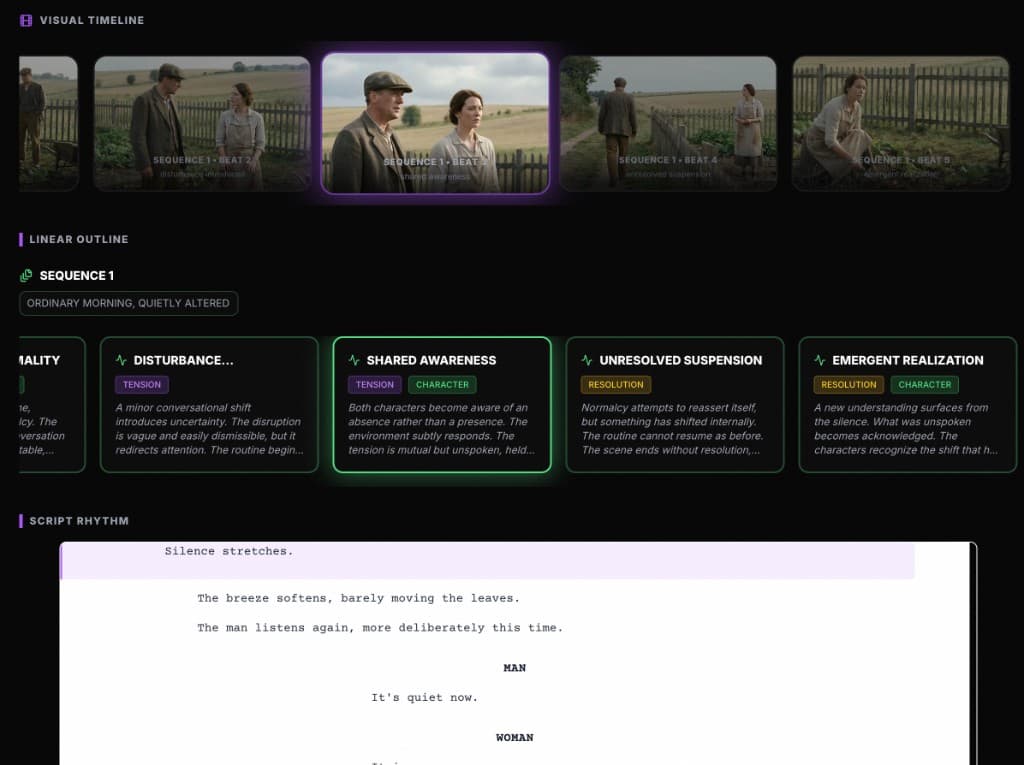
Want more than a mini breakdown?
Scene Extractor gives you a fast, free location list. ScreenWeaver goes further: it keeps your outline, beats, and script in sync so you can see structure, pacing, and sequences at a glance,before you ever hand pages to production.
Discover ScreenWeaver