Title Page Maker
Hollywood-standard screenplay cover page
Script title pages follow strict rules: margins, Courier 12pt, placement of contact and date. Many writers use Word or Google Docs and struggle to get it right. Fill in the form, click Generate, and download a one-page PDF formatted to industry standards.
How to use this screenplay title page generator
This free tool creates a professional screenplay title page (also called a cover page or front page) that follows Hollywood formatting standards.
- Enter your script title exactly as you want it to appear on the title page.
- Add your name under Author. Optionally fill in Based on if the script is adapted from existing material.
- Paste your contact information (name, email, phone, representation) in the Contact field, one item per line.
- Choose a date or version label (for example: "January 2026" or "Draft 2"), then click Generate PDF to download your formatted screenplay title page.
Standard screenplay title page format
Most film and TV readers expect a very specific layout for the title page of a script. This generator follows those conventions so your screenplay looks professional from the first page.
- Font: 12 pt Courier or Courier New, monospaced, black on white US Letter paper (8.5" × 11").
- Margins: 1.5" left, 1" right, 1" top and bottom , the same margins used for the main body of the script.
- The title is centered horizontally and placed roughly one third down the page, usually in ALL CAPS.
- Contact information and date/version sit at the bottom of the page, aligned to the left or right, single-spaced.
Complete SEO Guide: Title Page Maker
It generates a standards-compliant title page with clean hierarchy, accurate spacing, and readable contact information.
For this workflow, the central problem is clear: title pages are frequently rejected or perceived as amateur because of avoidable formatting inconsistencies. Left unresolved, this creates downstream friction and slower decisions. The practical target is a clean, submission-ready title page that matches professional screenplay presentation expectations.
Limitation to keep in mind: It does not judge creative branding choices or legal credit accuracy; it only enforces presentation consistency.
Advanced workflow: Use a versioned title-page convention tied to script draft IDs so every outbound submission package remains auditable.
Step-by-Step Workflow
- Fill in title, author, and adaptation credits with exact casing and spelling used in your final draft package.
- Add contact details in a readable block format and verify representation data before sending externally.
- Generate the page and check visual balance on desktop and print preview to avoid alignment surprises.
- Version the title page with each submission cycle to maintain traceability across contest and producer rounds.
Use Cases By Profile
- Writer: avoid first-impression rejection caused by avoidable format mistakes.
- Assistant: keep metadata synchronized between cover page, script headers, and submission tracker.
- Coordinator: maintain clean version control across contest and producer deliveries.
Common Mistakes To Avoid
- Over-designing the page with non-standard typography.
- Inconsistent naming between title page and script metadata.
- Missing contact or outdated representation information.
Professional Best Practices
- Keep the page minimal and industry-standard for maximum readability.
- Store version labels that match the exact script draft delivered.
- Use one authoritative source of contact info to prevent conflicting copies.
Treat this tool output as a decision support layer, not a replacement for authorship. Great scripts are remembered for specific choices, emotional precision, and clarity of dramatic movement. Tools help by removing noise so your energy can go where it matters: character, conflict, escalation, and payoff. If you review outcomes after each pass and keep an explicit log of accepted changes, your workflow becomes faster and more predictable from draft to draft. That consistency is exactly what professional collaborators value: fewer surprises, clearer rationale, and a script that evolves with intent.
Extended FAQ
What makes a title page look professional?
Correct typography, spacing discipline, and clear metadata hierarchy. Minimalism and consistency are more important than visual decoration.
Should I include draft number on every submission?
Yes when version clarity matters. Draft labels reduce confusion during notes rounds and help teams track decisions.
Can a bad title page hurt first impressions?
Absolutely. Readers infer process quality from presentation quality. A clean title page removes avoidable friction.
Where should representation details go?
In the contact block, formatted clearly and consistently with your submission package metadata.
Do contests reject on title page format alone?
Some do for clear non-compliance. Even when not rejected, poor formatting can reduce confidence in the script package.
How often should I regenerate title pages?
Whenever author/contact/version fields change. Keep one canonical version per draft ID.
FAQ – screenplay title page & cover page
Below are common questions about formatting a screenplay title page and using this free generator.
The screenplay title page (also called a cover page or front page) is the very first page of your script. It shows the title, the writer's name, and contact details. Readers and assistants see it before anything else, so it needs to look clean and professional. A correctly formatted title page signals that you understand industry standards.
Yes. Courier 12 pt (or Courier New / Courier Prime) is the long-standing standard for screenplays. It is monospaced, which keeps page count and reading rhythm consistent. Using Courier 12 pt on your title page and in your script is strongly recommended, especially when submitting to industry professionals, contests, or coverage services.
Your contact details (name, email, phone, and optionally agent/manager) are usually placed at the bottom-left or bottom-right corner of the title page. They should be easy to find but not visually compete with the title. This tool places your contact block near the bottom margin, exactly where readers expect to see it.
Yes. The same basic title page rules apply to feature films, TV pilots, spec episodes, and short films. As long as you are writing in standard screenplay format, a classic Hollywood-style title page is appropriate. You can customize the title, author name, contact block, and date for any project.
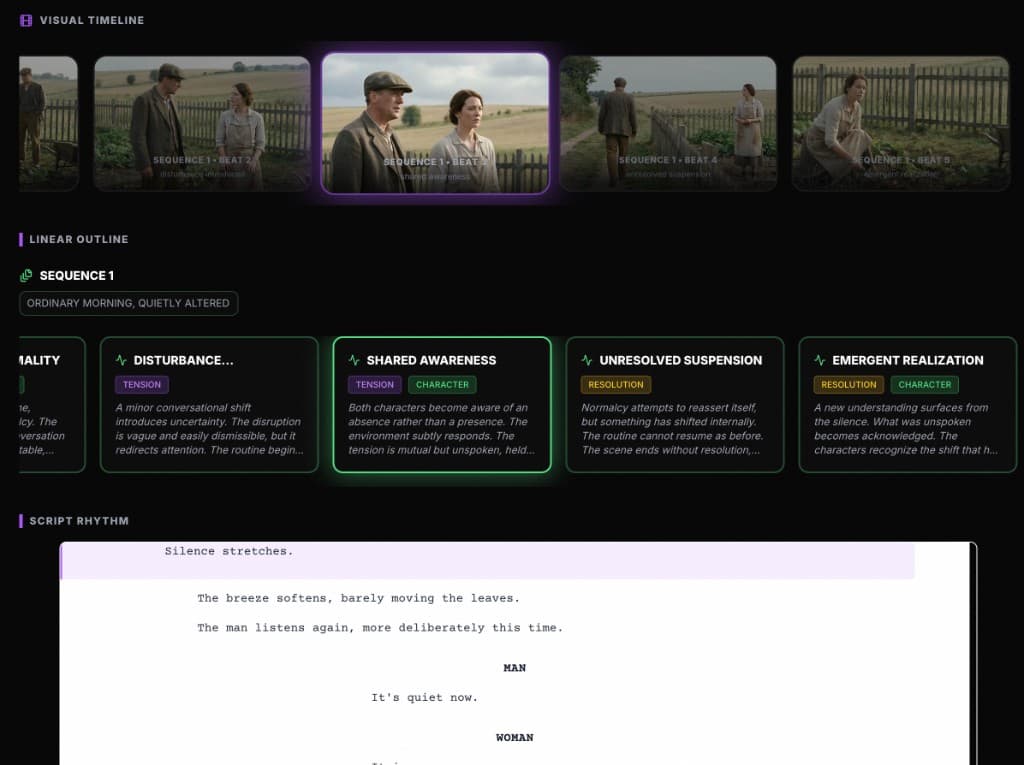
Go beyond the title page with ScreenWeaver
If you are serious about screenwriting, ScreenWeaver helps you visualize structure (acts, sequences, beats), keep characters consistent, and export industry-standard scripts. The Title Page Maker is just one small piece of a larger writing workflow.
Discover ScreenWeaver