

If you walked into a film school café in 2010, the laptops were divided into two distinct tribes: the wealthy students running Final Draft, and the scrappy ones running Celtx.
For nearly two decades, this has been the defining binary of screenwriting software. Final Draft was the expensive, immovable industry standard,the "suit" of the software world. Celtx was the rebel,the free (initially), cloud-based, all-in-one alternative for the indie filmmaker.
But it is now 2026. The lines have blurred. Celtx is no longer free; it’s a robust production studio. Final Draft is no longer offline-only; it has tentative cloud features. And new competitors (like ScreenWeaver) have entered the arena, challenging the very premise of "text-only" scriptwriting.
So, for the modern writer, producer, or student: Who actually wins the battle for the budget filmmaker in 2026? Is Celtx still the best value? Is Final Draft still mandatory for professionals? Let’s tear it down.
The Origin Stories: Legacy vs. Cloud
To understand the current state of these tools, you have to understand their DNA.
Final Draft: The Digital Typewriter
Final Draft was built to solve a specific problem in the 1990s: Standardization. Before Final Draft, scripts were a mess of different margins and fonts. Final Draft became the industry standard because it locked everything down. Its philosophy is: "Don't change anything. The script is a legal document." This makes it incredibly stable, but also notoriously slow to innovate.
Celtx: The Production Studio
Celtx (which stands for Crew, Equipment, Location, Talent, XML) started as an open-source alternative. Its philosophy was: "The script is just the first step." Celtx wanted to connect the script to the breakdown, the schedule, and the call sheet. It was the first major tool to embrace the cloud, making it the default choice for collaborative student projects.
The 2026 Reality Check
In 2026, "Cloud" is no longer a feature; it's a requirement. Final Draft has added collaboration, but it feels bolted on. Celtx lives in the browser, but it has become increasingly expensive and enterprise-focused.
Round 1: The Writing Experience
Let's strip away the budgeting tools and focus on the core task: Typing Fade In.
Final Draft
The Good: It is practically invisible. The "SmartType" (autocomplete for character names and scene headings) is still the gold standard. The keystrokes (Tab for character, Enter for action) are muscle memory for every professional. It rarely crashes.
The Bad: It feels archaic. Navigating a 120-page document feels like scrolling through a PDF. There is no visual context. It is a lonely, white page.
Celtx
The Good: It’s accessible anywhere. You can write on your iPad, your phone, or a library computer. The interface is modern and web-native.
The Bad: It can feel "floaty." Because it's browser-based, there is sometimes a micro-latency that professional touch-typists notice. Formatting quirks can pop up when exporting to PDF, leading to "orphan lines" that drive line producers crazy.
Round 2: From Script to Screen
This is where Celtx traditionally shined. Does it still hold up?
Celtx: The All-In-One Promise
Celtx is not just a screenwriting tool; it is a pre-production ecosystem.
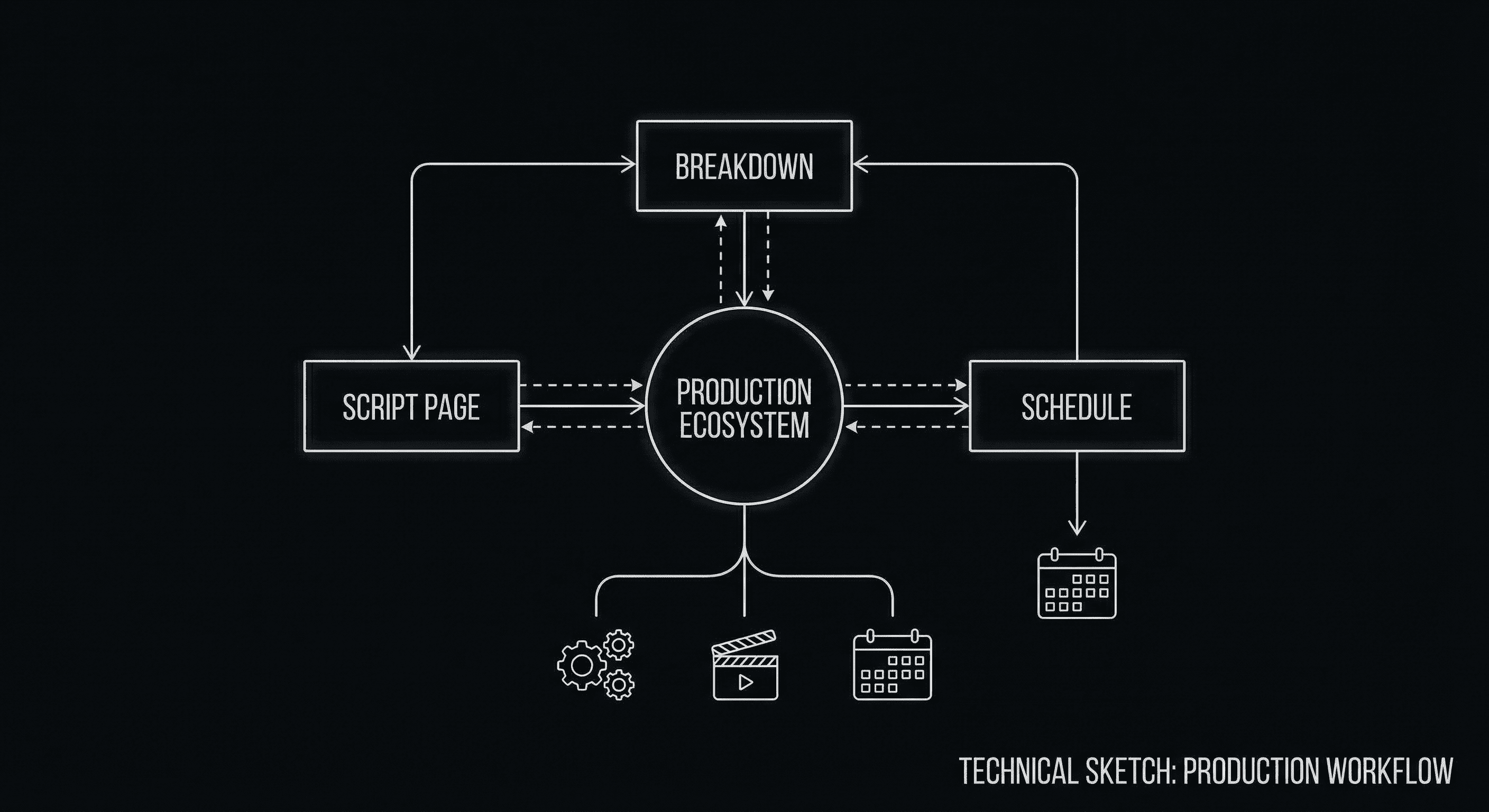
The Modern Studio: Connecting the script to the budget in real-time.
- Breakdowns: You can highlight props in the script, and they automatically populate a master list.
- Scheduling: It has a built-in stripboard to reorder scenes for shooting days.
- Budgeting: It connects those lists to costs.
The Verdict: For indie producers and students, this is amazing. It saves buying Movie Magic Scheduling/Budgeting (which cost hundreds of dollars). However, for professional productions, the budgeting tools are often considered "too simple" compared to specialized software.
Final Draft: The Tagger
Final Draft doesn't do budgeting. It does Tagging. You tag elements in the script, and then you export a .sex or .fdx file to import into Movie Magic.
The Verdict: It stays in its lane. It relies on the rest of the industry ecosystem.
Round 3: The Price of Admission
This is the biggest shift in 2026. Celtx used to be the "free" option. That is effectively over.
| Feature | Final Draft | Celtx | ScreenWeaver |
|---|---|---|---|
| Model | One-time License (~$250) | Monthly Subscription ($15-$30/mo) | Freemium / Monthly |
| Collaboration | Basic (Host/Join) | Real-time (Google Docs style) | Real-time & Visual |
| Mobile | Separate iOS App ($) | Included (Web/App) | Included (Web/App) |
| Visual Tools | None | Storyboards (Basic) | AI Generative Art & Decks |
The Math: If you use Celtx for 2 years, you have paid more than the cost of a Final Draft license. The "rental" model of Celtx makes it accessible short-term, but expensive long-term. Final Draft is a heavy upfront investment, but you own it (mostly).
The Missing Link: The Visual Revolution
Both Celtx and Final Draft share a common flaw: They are text-centric in a visual medium.
Celtx allows you to upload storyboards, but you have to draw them or find them elsewhere. Final Draft ignores visuals entirely.
This is where the industry is heading in 2026. Pitching has become visual. Show bibles are graphic novels.
Why ScreenWeaver Exists
We looked at Final Draft (great formatting) and Celtx (great production tools) and asked: "Where is the creativity?"
ScreenWeaver sits in the middle. It has the reliability of Final Draft's formatting engine. It has the cloud collaboration of Celtx. But it adds a third layer: Generative Visualization.
Don't just list "INT. SPACESHIP - DAY." See it. ScreenWeaver generates the concept art for that spaceship instantly, helping you write better action lines and giving you a pitch-ready asset immediately.
The Final Verdict (2026 Edition)
Choose Final Draft If:
- You are a professional TV writer hired onto an existing show (it will be mandatory).
- You are handing off files to a traditional Line Producer.
- You hate subscriptions and want to pay once.
Choose Celtx If:
- You are a student producing your own short films.
- You need to schedule shoots and create call sheets yourself.
- You work across multiple computers and need browser access.
Choose ScreenWeaver If:
- You want to write visually.
- You are pitching original concepts and need to impress producers with more than just text.
- You want the structure tools of a modern app with the formatting of a pro tool.
- You want a modern, dark-mode, distraction-free interface that actually feels like 2026.
The tool doesn't write the script. But the right tool makes the writing matter.
Stop Renting. Start Creating.
Experience the best of both worlds: Professional Formatting + Modern Visuals.
Try ScreenWeaver for FreeFinal Step
Build your next script with Screenweaver
Move from ideas to production-ready pages faster with timeline-native writing and AI-assisted story flow.
Try Screenweaver